Among the KYC (Know Your Customer) documents required to be linked with your UAN on the EPFO portal, PAN (Permanent Account Number) holds special significance. While Aadhaar enables your digital identity verification and ABPS payment, PAN is the tax compliance document that determines how your EPF withdrawals are taxed — and whether you pay TDS at 10% or a punishing 20%.
Linking your PAN with your UAN is a mandatory step for smooth EPF operations. Without it, any premature EPF withdrawal (before 5 years of service) will attract the maximum TDS rate under Section 206AA of the Income Tax Act. In 2026, with EPFO‘s fully digital processing infrastructure, PAN linking is quick, straightforward, and essential for every member to complete.
Why PAN Linking Matters for EPF Members
- Ensures TDS at 10% (instead of 20%) on EPF withdrawals before 5 years of service.
- Required for EPFO to generate Form 26AS tax credit records for your withdrawals.
- Mandatory KYC for processing large withdrawal claims and final PF settlement.
- Enables seamless online claim filing for members with less than 5 years of service.
- Essential for joint PAN-Aadhaar KYC compliance mandated by EPFO’s 2026 norms.
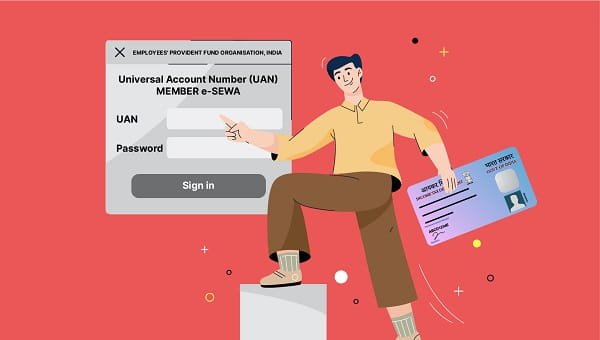
Step-by-Step: How to Link PAN with UAN on EPFO Portal
| 1 | Log in to the EPFO Member Portal at https://unifiedportal-mem.epfindia.gov.in using your UAN and password. |
| 2 | Click on ‘Manage’ in the top menu and select ‘KYC’ from the dropdown. |
| 3 | On the KYC update page, select ‘PAN’ from the list of document types. |
| 4 | Enter your 10-character PAN number in the designated field. |
| 5 | Enter your name exactly as it appears on your PAN card. |
| 6 | Click ‘Save’ to submit your PAN linking request. |
| 7 | Your employer must approve the PAN KYC request on the Employer Portal for it to be verified. |
| 8 | Once employer-approved, the Income Tax Department verifies the PAN details. Status changes to ‘Verified’. |
TDS on EPF Withdrawal – How PAN Affects Your Taxes
Understanding the tax implications of EPF withdrawal helps clarify why PAN linking is so important:
Withdrawal after 5+ years of continuous service: Fully tax-exempt. No TDS regardless of PAN. But PAN is still needed for IT return compliance.
Withdrawal before 5 years WITH PAN linked: TDS @ 10% under Section 192A on amounts above Rs. 50,000. Income is taxable; can claim refund if income is below taxable limit.
Withdrawal before 5 years WITHOUT PAN: TDS @ 20% under Section 206AA. Significantly higher deduction — completely avoidable by simply linking PAN.
Transfer of PF (not withdrawal): No TDS applicable regardless of PAN or service years.
How to Check PAN Linking Status on EPFO Portal
- Log in to EPFO Member Portal → Click ‘Manage’ → Select ‘KYC’.
- Find PAN in the KYC documents list and check the status column.
- ‘Pending’ = Submitted, awaiting employer approval.
- ‘Approved by Employer’ = Sent to Income Tax Dept for verification.
- ‘Verified’ = PAN successfully linked. TDS benefits now active.
Conclusion
Linking your PAN with your UAN is a simple, one-time process that takes less than 5 minutes but has significant long-term financial implications. It ensures correct TDS treatment on withdrawals, enables seamless claim processing, and keeps your EPFO account fully tax-compliant.
Complete PAN linking alongside Aadhaar and bank account KYC immediately after UAN activation. Once your employer approves all three KYC documents and they show ‘Verified’ status on the portal, your EPFO account will be fully equipped for all digital services, including auto-settlement of claims, paperless withdrawals, and accurate tax reporting.
Frequently Asked Questions (FAQs)
Q: Why is PAN linking mandatory for EPF withdrawal?
A: PAN linking is critical for EPF withdrawals, particularly because of the TDS (Tax Deducted at Source) provisions under the Income Tax Act. If an employee withdraws their EPF before completing 5 years of continuous service, the withdrawal amount is subject to TDS at 10% if PAN is provided. Without a valid PAN linked to the UAN, TDS is deducted at the much higher rate of 20% under Section 206AA. Furthermore, for employees who have completed 5 or more years of continuous service, EPF withdrawal is fully tax-exempt, but a valid PAN is still required for EPFO to process the tax exemption claim and generate Form 26AS records. In short, PAN ensures correct tax treatment for every EPF transaction.
Q: Can I link PAN and Aadhaar at the same time on the EPFO portal?
A: Yes, you can link multiple KYC documents simultaneously on the EPFO Member Portal. The KYC page allows you to add Aadhaar, PAN, and bank account details in the same session — each as a separate entry. Once submitted, all three will go to your employer for approval simultaneously. There is no need to wait for one KYC document to be approved before submitting another. It is best practice to submit all required KYC documents (Aadhaar, PAN, and bank account) in a single session to save time and ensure your account is fully KYC-compliant as quickly as possible.
Q: What if my name in PAN does not match my EPFO records?
A: If the name on your PAN card does not match the name in your EPFO records, the PAN KYC verification will fail. To resolve this, you have two options: update your name in EPFO records to match your PAN by submitting a joint declaration through your employer on the EPFO Employer Portal, or correct your name in your PAN card by submitting a correction application to the Income Tax Department through NSDL or UTI. Generally, updating EPFO records is faster and simpler. Your employer submits the member profile update request, and once EPFO approves the change, you can resubmit your PAN linking request with the corrected name.
Q: How long does PAN verification take on the EPFO portal?
A: The PAN verification process on EPFO has two stages. First, your employer must approve your PAN KYC on the Employer Portal, which typically takes 1–7 working days depending on HR responsiveness. After employer approval, EPFO sends the PAN details to the Income Tax Department’s database for verification. This automated verification usually completes within 1–3 working days. Therefore, the total PAN linking process typically takes 3–10 working days from the date of submission. You can monitor the status by logging into the EPFO portal under ‘Manage’ > ‘KYC’ — it will show ‘Pending’, ‘Approved by Employer’, or ‘Verified’.
Q: What happens if I don’t link PAN with my UAN?
A: Failing to link PAN with your UAN has two significant consequences. First, if you withdraw EPF before completing 5 years of service, TDS will be deducted at 20% (instead of 10%) on the withdrawal amount under Section 206AA of the Income Tax Act, because PAN is absent. This directly reduces the net amount you receive. Second, certain online claim processes — particularly withdrawal claims for members with less than 5 years of service — may be delayed or require additional manual verification without PAN. EPFO may also flag your account for tax compliance review. Linking PAN is a simple one-time process that takes minutes and prevents these financial and procedural complications.