Your EPF passbook is the official financial record of your provident fund account — showing every monthly contribution made by you and your employer, interest credited annually, and any withdrawals or transfers processed. Downloading your EPF passbook regularly is essential for verifying that contributions are correct, tracking your retirement corpus growth, and having documentation available for claim filings, loan applications, or financial planning.
In 2026, downloading your EPF passbook is a straightforward digital process available through the EPFO portal, passbook portal, and UMANG app. This guide covers the complete process for each method.
What Information Is in the EPF Passbook?
| Passbook Section | Information Shown |
| Header | UAN, Member ID, employer name, establishment address |
| Contribution Entries | Month and year, employee contribution amount, employer EPF contribution |
| Interest Credits | Annual interest credited to account at declared rate |
| Transfer Credits | Amount received from previous employer’s Member ID |
| Withdrawal Debits | Amounts debited for partial advances or full settlement |
| Opening Balance | Balance carried forward from previous financial year |
| Closing/Net Balance | Current total EPF corpus as of last updated entry |
Method 1: Download EPF Passbook from EPFO Member Portal
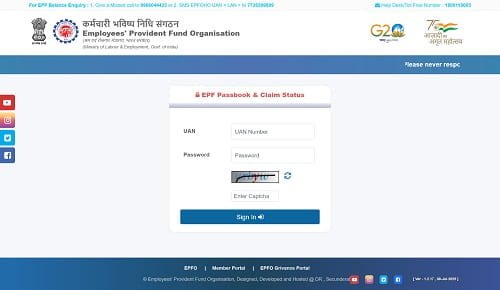
| 1 | Open your browser and go to: https://unifiedportal-mem.epfindia.gov.in |
| 2 | Enter your UAN and password and click ‘Sign In’. |
| 3 | From the top menu, click ‘View’ → ‘Passbook’. |
| 4 | A dropdown shows all Member IDs linked to your UAN. Select the desired Member ID. |
| 5 | The passbook for that Member ID loads on screen. |
| 6 | Click ‘Download Passbook’ at the top of the passbook page to save as PDF. |
| 7 | The PDF is saved to your device’s download folder. Open with any PDF reader. |
Method 2: Download EPF Passbook from passbook.epfindia.gov.in
| 1 | Visit the dedicated passbook portal: https://passbook.epfindia.gov.in |
| 2 | Enter your UAN and EPFO Member Portal password. |
| 3 | Select the Member ID from the list of all linked IDs. |
| 4 | The passbook entries load for the selected account. |
| 5 | Use the ‘Download’ or ‘Print’ option to save the passbook as a PDF. |
Method 3: Download EPF Passbook via UMANG App
| 1 | Open UMANG app → search ‘EPFO’ → select EPFO service. |
| 2 | Tap ‘Employee Centric Services’ → ‘View Passbook’. |
| 3 | Login with UAN and password. |
| 4 | Select the Member ID and view passbook entries. |
| 5 | Tap the download icon to save or share the passbook. |
Common Issues When Downloading EPF Passbook
| Issue | Likely Cause | Solution |
| Passbook not loading | Portal maintenance or server load | Try at off-peak hours; use passbook.epfindia.gov.in |
| ‘Passbook not available’ message | KYC not verified or member ID not active | Complete KYC verification with employer |
| Missing contributions in passbook | Employer ECR delay or non-payment | Follow up with HR; raise EPFiGMS grievance if unresolved |
| Interest not credited | Annual interest pending ratification | Normal – credited after Finance Ministry ratification |
| Multiple Member IDs showing | Multiple employers over career | Normal; download passbook for each ID separately |
| Downloaded PDF is blank | Browser/PDF reader issue | Try different browser or update PDF reader |
Frequently Asked Questions (FAQs)
Q1. Is the EPF passbook the same as the EPF statement for income tax?
Ans: The EPF passbook and the EPF annual statement (or Form 16) serve different purposes. The EPF passbook is a real-time record of all transactions in your EPF account — contributions, interest, and withdrawals — updated regularly throughout the year. The EPF annual statement (sometimes provided by employers along with Form 16) is a formal year-end document showing total EPF contribution for the financial year. For income tax purposes, the EPF contributions shown in your Form 16 (under Section 80C) are the authoritative source. The passbook is useful for tracking and verification, but the employer’s Form 16/TDS certificate is the official tax document. Both together provide a complete picture of your EPF savings and tax deductions.
Q2. How far back does the EPF passbook go?
Ans: The EPFO passbook available online typically covers the period from when the member’s account was digitized or linked to the UAN system. For most members, this means passbook entries from approximately 2012–2015 onward are available, as the digital migration was progressive. Very old accounts (pre-2012) may not have complete digital passbook history, though contribution records exist in EPFO’s databases. For accounts with long service histories, earlier records may need to be requested directly from the EPFO Regional Office. For practical purposes, the digital passbook covering the last 10–12 years is available for most current members and covers the bulk of their active EPF savings history.
Q3. Can I share my EPF passbook as proof of savings for a loan?
Ans: Yes. The EPF passbook (downloaded as a PDF from the EPFO portal) is widely accepted as a proof of savings and retirement corpus by banks, housing finance companies, and other lenders. It shows your accumulated EPF corpus, which can support loan applications for home loans, personal loans, or education loans. Some lenders specifically require the EPF passbook as part of their financial documentation for creditworthiness assessment. The downloaded passbook PDF from the official EPFO portal carries EPFO’s digital authentication and is generally accepted as an official document. For higher-stakes applications, some lenders may request a physical statement or an EPFO-certified document from the Regional Office.
Q4. Why are some months missing from my EPF passbook?
Ans: Missing months in your EPF passbook can indicate that your employer did not file the ECR (Electronic Challan-cum-Return) for those months or filed it but did not make the corresponding payment. This is a compliance violation by the employer. First, cross-check with your salary slips — if the EPF deduction was made from your salary for those months but not reflected in the passbook, your employer deducted EPF but may not have remitted it. This is a serious issue: it means your money was taken from you but not deposited with EPFO. Raise this immediately with your employer’s HR, and if unresolved, file a complaint with EPFiGMS and EPFO’s enforcement wing. EPFO has the authority to demand arrears plus interest and penalties from non-compliant employers.
Q5. Can I get a physical EPF passbook issued?
Ans: Historically, EPFO used to issue physical passbooks and annual statements. In 2026, EPFO has fully transitioned to digital passbooks — physical passbooks are no longer routinely issued. The digital passbook accessible on the portal and UMANG app serves as the official record, and the downloadable PDF version is accepted for all official and financial purposes. If you need a certified physical statement (for example, for court proceedings or certain government applications that require a wet-signature certification), you can visit the EPFO Regional Office and request a certified copy of your passbook statement — the Regional Office can print and certify it with an official seal as needed for specific formal purposes.
Conclusion
Downloading and reviewing your EPF passbook is one of the simplest and most impactful financial habits you can develop. A monthly review of your passbook takes less than 5 minutes and ensures that every rupee you contributed — and every rupee your employer contributed — is correctly recorded and growing at 8.25% per annum.
Save a copy of your EPF passbook every quarter, check for contribution gaps, and verify the annual interest credit after the official declaration. These small habits compound over your career into significant financial awareness and protection of your retirement corpus.