Your Universal Account Number (UAN) is the gateway to all your EPFO digital services — from checking your PF balance and downloading your passbook to filing withdrawal claims and transferring your provident fund. However, before you can use any of these services, you must complete a one-time UAN activation process on the EPFO Member Portal.
UAN activation creates your secure login credentials for the EPFO portal, verifies your identity through your Aadhaar-linked OTP, and links your EPFO account to your digital profile. The process takes less than 5 minutes and can be done from any smartphone or computer with internet access. In 2026, EPFO’s seamless Aadhaar-based activation system makes this process faster and more reliable than ever before.
What You Need Before Activating Your UAN
- Your UAN – provided by your employer via SMS or HR department.
- Aadhaar number – the 12-digit Aadhaar number issued by UIDAI.
- Mobile number registered with Aadhaar – required to receive the OTP.
- Date of Birth – as per your Aadhaar card.
- Full Name as per Aadhaar – for identity matching with EPFO records.
Step-by-Step Guide: How to Activate UAN Online
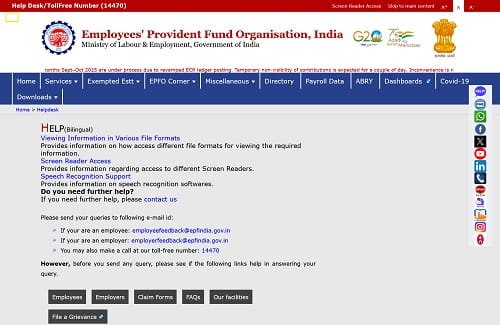
| 1 | Open your browser and go to the EPFO Member Portal: https://unifiedportal-mem.epfindia.gov.in |
| 2 | On the login page, click ‘Activate UAN‘ under the ‘Important Links’ section on the right side. |
| 3 | Enter your UAN (provided by your employer), your Aadhaar number, and your name as per Aadhaar. |
| 4 | Enter your Date of Birth and the mobile number registered with your Aadhaar. |
| 5 | Tick the checkbox to authorise EPFO to use Aadhaar OTP for verification and click ‘Get Authorization PIN’. |
| 6 | An OTP will be sent to your Aadhaar-linked mobile number. Enter this OTP in the field provided. |
| 7 | Click ‘Validate OTP and Activate UAN’. Your UAN will be activated immediately. |
| 8 | Set a strong password for your EPFO account (minimum 8 characters with letters, numbers, and special characters). |
| 9 | You can now log in to the EPFO Member Portal using your UAN and newly created password. |
What to Do After UAN Activation
Once your UAN is activated, complete the following essential steps to fully unlock all EPFO services:
Step 1 – Link Your Aadhaar
Go to ‘Manage’ > ‘KYC’ on the portal and link your Aadhaar. Aadhaar seeding enables Aadhaar-Based Payment Bridge (ABPS) for instant claim settlement up to Rs. 1 lakh.
Step 2 – Link Your PAN
Add your PAN card under the KYC section. PAN is mandatory for tax-free EPF withdrawals and for members with service of less than 5 years.
Step 3 – Add Bank Account
Enter your savings bank account number and IFSC code. Your employer must approve this for it to become active. This account will receive all EPF claim payments via NEFT.
Step 4 – File e-Nomination
Go to ‘Manage’ > ‘e-Nomination’ and designate your family members as nominees for EPF and EPS death benefits. This is a critical step often overlooked by new members.
Step 5 – Download Your Passbook
After your first contribution is posted (usually by the end of the first payroll month), you can download your passbook from the ‘View’ section to verify contributions.
Common Errors During UAN Activation and How to Fix Them
Error: ‘Name does not match’ – The name entered must exactly match the name on your Aadhaar card (including spelling, initials). Even minor differences will cause a mismatch error.
Error: ‘Mobile number not registered with UIDAI’ – Your current mobile number is not linked to your Aadhaar. Update your mobile at an Aadhaar centre, then retry activation.
Error: ‘UAN already activated’ – Your UAN was previously activated, likely by a past employer or yourself. Use ‘Forgot Password’ to regain access.
Error: ‘OTP expired’ – EPFO OTPs are valid for 3 minutes. Enter it promptly and request a new OTP if it expires.
Frequently Asked Questions (FAQs)
Q1. What if I don’t receive the OTP during UAN activation?
If you do not receive the OTP on your mobile during UAN activation, first ensure that the mobile number you entered matches the one registered with your Aadhaar at UIDAI. If there is a mismatch, the OTP will not be delivered. You can verify your Aadhaar-registered mobile number by visiting the UIDAI website (https://myaadhaar.uidai.gov.in) or by visiting the nearest Aadhaar Enrolment Centre. If the number is correct but the OTP is still delayed, wait 60 seconds and click ‘Resend OTP’. If the problem persists, ensure your network signal is strong. As a last resort, contact the EPFO helpline at 1800-118-005 for manual assistance.
Q2. Can I activate my UAN without an Aadhaar-linked mobile number?
Standard UAN activation on the EPFO portal requires an OTP sent to your Aadhaar-registered mobile number, so an Aadhaar-linked mobile is technically necessary for online activation. However, if your mobile number is not linked to Aadhaar, you can first update your mobile number in Aadhaar by visiting an Aadhaar Enrolment Centre with valid identity proof, and then proceed with UAN activation once the update is complete (usually within 7–10 working days). Alternatively, you may visit your employer’s HR department or the nearest EPFO Regional Office for assisted activation.
Q3. I activated my UAN but forgot my password. How do I reset it?
If you forget your EPFO portal password after activation, resetting it is straightforward. Go to the EPFO Member Portal login page and click on ‘Forgot Password’. Enter your UAN and registered mobile number. An OTP will be sent to your registered mobile. Enter the OTP, verify your identity, and you will be prompted to set a new password. The new password must meet EPFO’s security requirements (minimum 8 characters, combination of uppercase, lowercase, numbers, and special characters). If your registered mobile number has changed, you will need to first update it through your employer or by visiting the nearest EPFO office.
Q4. How do I know if my UAN is already activated?
You can check if your UAN is already activated by going to the EPFO Member Portal login page and attempting to log in with your UAN and a password. If the account is activated, it will either log you in (if you know the password) or show a ‘wrong password’ error (indicating activation is done but you need to reset the password). If the UAN is not yet activated, the system will show a message saying the account is not active. You can also check activation status by clicking ‘Know Your UAN Status’ on the portal and entering your Aadhaar or PAN number — the system will show whether your UAN is active.
Q5. What is the difference between UAN activation and KYC linking?
UAN activation and KYC linking are two separate but complementary steps. UAN activation is the one-time process of creating a login password for your EPFO Member Portal account so that you can access it online. It confirms your identity via Aadhaar OTP and sets up your portal credentials. KYC (Know Your Customer) linking is the subsequent step of attaching your identity and financial documents — specifically Aadhaar, PAN, and bank account — to your activated UAN. KYC linking is what enables you to file online claims, receive Aadhaar-based auto-settlement, and ensures your identity is verified for all transactions. Both steps are essential: activation lets you log in, KYC lets you transact.
Conclusion
UAN activation is the single most important first step for any new EPFO member. It takes just 5 minutes but unlocks the entire suite of EPFO’s digital services — passbook access, online claims, PF transfers, KYC management, and nomination filing — all from the convenience of your phone or laptop.
Activate your UAN on the day you receive it, complete your KYC in the same session, and you will be fully set up for a smooth, paperless EPF experience throughout your career. Do not delay — an unactivated UAN means you cannot monitor or manage your most important retirement savings asset.