The EPFO Login Portal is the official digital gateway provided by the Employees’ Provident Fund Organisation (EPFO) of India that allows members, employers, and pensioners to access, manage, and monitor all Provident Fund (PF) services online — without visiting a physical EPFO office.
The EPFO — operating under the Ministry of Labour and Employment, Government of India — manages three social security schemes for salaried employees across India:
- Employees’ Provident Fund (EPF): Retirement savings through monthly contributions by employee and employer
- Employees’ Pension Scheme (EPS): Monthly pension after 10 years of eligible service and retirement at age 58
- Employees’ Deposit Linked Insurance (EDLI): Life insurance coverage for active EPF members
The EPFO Login Portal, through its Unified Member Portal and Employer Portal, gives every stakeholder secure, 24/7 digital access to services that were once available only through paper-based processes at regional offices.
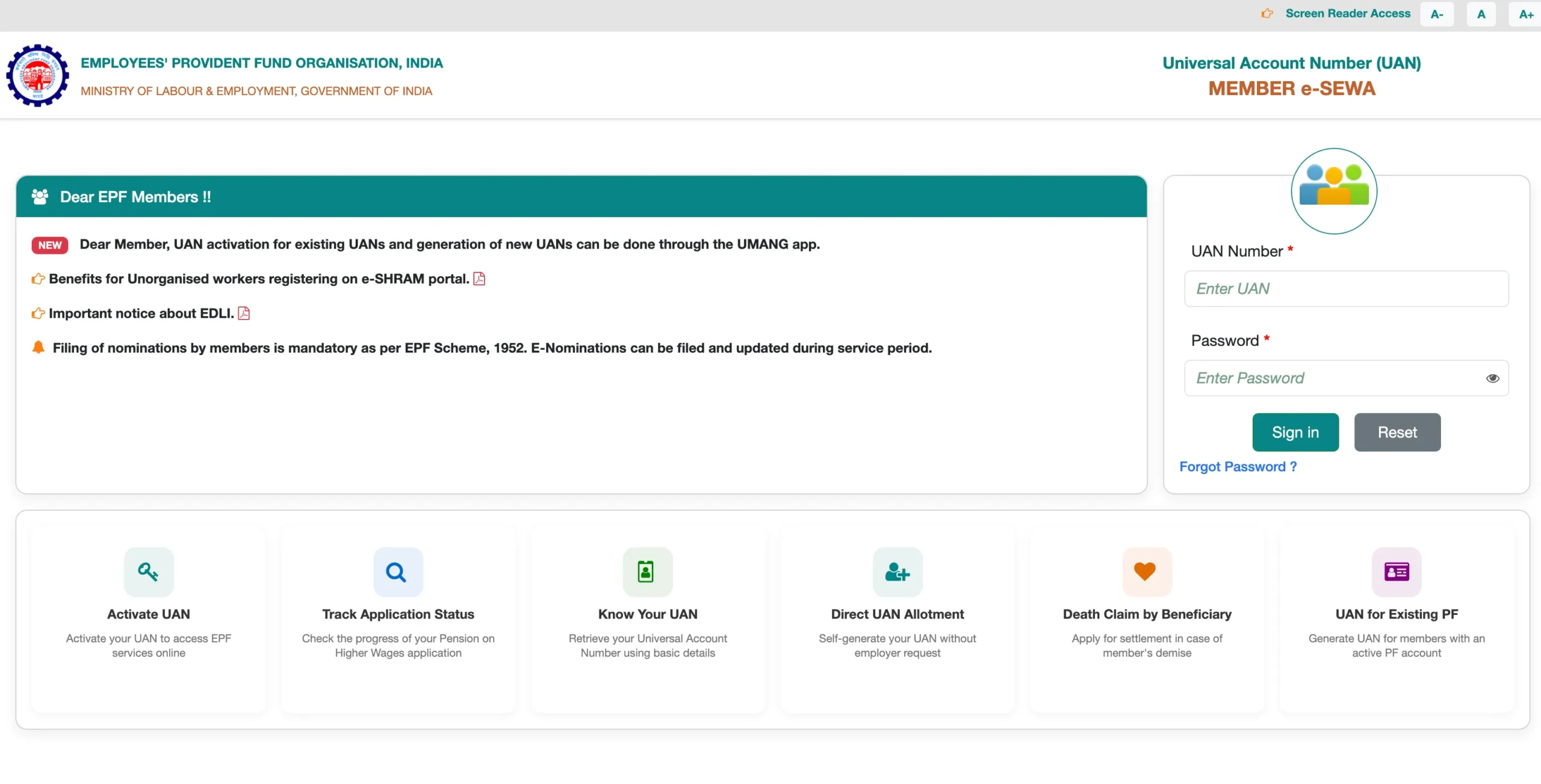
Official EPFO Portal URLs – Quick Reference
Knowing the correct official URLs prevents phishing and ensures secure access to all EPFO services:
|
Portal |
Purpose |
Official URL |
|
EPFO Main Website |
Information hub for all EPFO services |
epfindia.gov.in |
|
Member Portal (UAN Login) |
Member login for passbook, claims, KYC |
unifiedportal-mem.epfindia.gov.in |
|
Employer Portal |
Employer login for ECR, contributions, compliance |
unifiedportal-emp.epfindia.gov.in |
|
Passbook Portal |
Direct passbook login |
passbook.epfindia.gov.in |
|
UAN Generation / Activation |
Face Authentication via UMANG app |
umang.gov.in |
Security Alert: Always verify that the URL ends with epfindia.gov.in before entering your UAN, password, or any personal details. Numerous unofficial portals closely imitate EPFO’s interface to steal member credentials.
EPFO Overview – Scale and Significance (2026)
To understand why the EPFO Login Portal matters, consider the scale of the organization:
- EPFO manages PF accounts for over 7 crore active members across India
- Over 85.3 million claims were processed by EPFO in FY 2025–26 as of January 23, 2026 — higher than the previous year
- The EPF interest rate for FY 2025–26 is 8.25% per annum, credited annually to all active member accounts
- EPFO’s EPFO 3.0 upgrade is delivering faster, more transparent digital services with claim settlements in 3–5 working days for members with verified KYC
- Every salaried employee earning up to ₹15,000 per month in a company with 20 or more employees is mandatorily covered under EPF
EPFO Member Login – Step-by-Step Guide 2026
What You Need Before Logging In
Before attempting EPFO Member Login, ensure the following are ready:
- UAN (Universal Account Number): Your 12-digit unique ID. Check your salary slip or ask your HR department if you don’t know it
- Password: The password set during UAN activation
- Registered Mobile Number: Active mobile number linked to your UAN for OTP verification
- CAPTCHA Code: Displayed on the login screen for security verification
Step-by-Step EPFO Member Login Process
- Open your browser and visit the official EPFO website: epfindia.gov.in
- On the homepage, hover over “Our Services” in the top navigation menu
- Click on “For Employees” from the dropdown
- Under the Services section, click on “Member UAN/Online Service (OCS/OTCP)” — this redirects you to the Unified Member Portal
- You can also go directly to: unifiedportal-mem.epfindia.gov.in
- On the login page, enter:
- – UAN — your 12-digit Universal Account Number
- – Password — your EPFO account password
- – CAPTCHA — the verification code shown on screen (type manually; do not copy-paste)
- Click “Sign In”
- An OTP will be sent to your registered mobile number — enter it to complete two-factor authentication
- You are now logged in to your EPFO Member Dashboard
What You Can Do After Member Login
Once logged in, your EPFO Member Dashboard gives access to the following services:
- View Passbook — Download your complete PF contribution history
- Check PF Balance — See your current EPF and EPS account balance
- Submit Online Claim — File Form 19, Form 31, Form 10C, or Form 10D for withdrawal or advance
- Track Claim Status — Monitor the progress of any active or past claim
- Update KYC Details — Link and verify Aadhaar, PAN, and bank account
- Manage e-Nomination — Add or update your PF nominee via Aadhaar OTP
- Transfer PF Account — Initiate transfer from previous employer using Form 13
- Update Member Profile — Correct name, date of birth, gender, or other profile details online
EPFO Passbook Login – How to Download & Check PF Balance
The EPFO Passbook is the most widely accessed feature on the portal. It provides a complete month-by-month record of all PF contributions — including the employee share, employer share, and interest credited.
Method 1: Passbook via Member Portal
- Log in at unifiedportal-mem.epfindia.gov.in using your UAN and password
- After successful login, click on “View Passbook (New)” on the dashboard
- Your passbook will open showing:
- Monthly employee contributions
- Monthly employer contributions
- Interest credited for each financial year
- Transfer entries from previous employers
- Current total EPF and EPS balance
Method 2: Direct Passbook Login
- Visit the dedicated EPFO Passbook portal: passbook.epfindia.gov.in
- Enter your UAN number and Password
- Enter the CAPTCHA and click Login
- Select the Member ID (PF account) you wish to view
- Your passbook opens with the complete transaction history
Method 3: EPFO Passbook via UMANG App
- Download the UMANG App from Google Play Store or Apple App Store
- Log in using your registered mobile number with MPIN or OTP
- Search for “EPFO” and tap on it
- Select “Employee Centric Services”
- Tap on “View Passbook” to see your EPF balance and contributions
Method 4: Passbook Balance via Missed Call
Give a missed call from your registered mobile number to the official EPFO missed call number. You will receive an SMS with your current PF balance and the last contribution details.
- Missed Call Number: 9966044425
- Alternate Number: 011-22901406
Method 5: Passbook via SMS
Send an SMS from your registered mobile number to 7738299899 in the format:
EPFOHO UAN ENG (Replace ENG with your preferred language code)
|
Language |
Code |
|
English |
ENG |
|
Hindi |
HIN |
|
Telugu |
TEL |
|
Tamil |
TAM |
|
Punjabi |
PUN |
|
Gujarati |
GUJ |
|
Marathi |
MAR |
|
Kannada |
KAN |
|
Malayalam |
MAL |
|
Bengali |
BEN |
You will receive basic PF balance and contribution details via SMS, free of charge.
UAN Login – What is UAN and Why Does It Matter?
What is UAN?
The Universal Account Number (UAN) is a permanent 12-digit identification number assigned by EPFO to every EPF member when they first start working in a covered establishment. It is a digital identity that stays with the employee throughout their entire career, regardless of how many times they change jobs.
The UAN acts as a master account number under which all PF accounts from different employers are consolidated. Before UAN, each job change created a new PF account that had to be manually transferred. UAN eliminated this fragmentation — today, all your PF accounts from different companies are visible under a single UAN login.
How to Find Your UAN
- From your salary slip — Most employer payslips print the UAN number
- From your employer / HR department — Ask HR to provide your UAN
- From the EPFO portal — Visit epfindia.gov.in → “Know Your UAN” under Important Links, and enter your Aadhaar or PAN to retrieve it
- From your offer letter or joining documents — Some companies mention UAN in onboarding documents
UAN Activation in 2026 – Major Change (Face Authentication)
In 2026, EPFO has discontinued UAN activation through the web portal. UAN activation is now exclusively done through the UMANG App using Aadhaar-based Face Authentication Technology (FAT).
From August 1, 2025, EPFO made it mandatory for new employees to generate UAN only through Aadhaar-based Face Authentication Technology in the UMANG App. The EPFO took this decision to ensure error-free generation of UAN and prevent identity fraud.
Three services are now available on the UMANG App via Face Authentication:
- Direct UAN Allotment and Activation — For new employees who do not yet have a UAN
- UAN Activation for Existing UANs — For employees who have a UAN but haven’t activated it
- Face Authentication Service for Existing Activated UANs — For enhanced security
How to Activate UAN via UMANG App (2026)
- Download the UMANG App from Google Play Store or Apple App Store
- Also download the Aadhaar Face RD App (required for face authentication)
- Open UMANG and navigate to “EPFO Services”
- Select “UAN Services Through Face Auth”
- Choose “UAN Activation” (for existing UAN) or “UAN Allotment and Activation” (for new UAN)
- Enter your Aadhaar number and the mobile number linked to your Aadhaar
- Tick the consent box and click “Send OTP” — enter the OTP received
- Complete live face authentication — the Aadhaar Face RD app will activate your camera
- Position your face within the frame; when the outline turns green, the image is captured
- EPFO matches the image with the Aadhaar database
- Your UAN is activated and you receive an SMS with your UAN and a temporary password
- Download your e-UAN Card instantly from the UMANG app or EPFO Member Portal
How to Reset EPFO/UAN Login Password
If you have forgotten your EPFO UAN login password:
- Visit unifiedportal-mem.epfindia.gov.in
- Click on “Forgot Password” on the login page
- Enter your UAN number and the CAPTCHA
- Enter your name, date of birth, and gender — then click Verify
- Confirm your registered mobile number and click “Get OTP”
- Enter the OTP received on your mobile number
- Set a new password of your choice
- Use the new password to log in immediately
EPFO Employer Login – Complete Guide 2026
The EPFO Employer Portal is a separate login interface designed for companies, establishments, HR managers, and payroll departments to manage employee PF contributions and compliance obligations.
What Employers Can Do on the Portal
- Register new employees and generate UANs (for exceptional cases)
- Upload and file Electronic Challan cum Return (ECR) — the monthly PF return
- Deposit monthly PF contributions for all employees
- Approve employee KYC documents (Aadhaar, PAN, bank account)
- Verify service history and exit dates for employees
- Generate compliance reports and audit-ready records
- Correct contribution discrepancies
- Manage establishment profile and contact details
How to Access EPFO Employer Login
- Go to the EPFO main website: epfindia.gov.in
- Click on “Our Services” and select “For Employers”
- Click on “Employer Portal” or “Establishment e-Sewa”
- Or go directly to: unifiedportal-emp.epfindia.gov.in
- Enter your:
- Establishment ID — Your company’s EPFO registration number
- Password — EPF Employer login password
- CAPTCHA — Security verification code
- Click “Sign In” to access the employer dashboard
Employer Compliance Deadline
Employers must file the ECR and make PF payments by the 15th of every month to avoid penalties and interest charges. Delayed or incorrect filings attract interest at 12% per annum on unpaid amounts and a penalty under Section 14B of the EPF Act.
EPFO 3.0 Update for Employers (March 2026): From March 11, 2026, the EPFO portal now provides only summary-level ECR downloads, removing employee-wise detailed reports. HR teams must maintain internal payroll records to avoid compliance gaps.
EPFO Passbook Not Showing – What to Do
Many members encounter issues where the passbook is blank or not updated. Here is a comprehensive guide:
Reason 1: UAN Not Activated
Fix: Activate your UAN through the UMANG App using Aadhaar-based face authentication (as detailed above).
Reason 2: KYC Not Approved
Fix: Log in to the Member Portal → Manage → KYC. Ensure your Aadhaar, PAN, and bank account are verified (shown with green tick). If pending, follow up with your employer to approve the KYC.
Reason 3: Passbook Under Maintenance
EPFO periodically carries out system maintenance and ledger posting updates. Passbook updates for recent wage months may show delayed visibility temporarily. Check the official EPFO website for maintenance announcements.
Reason 4: Employer Has Not Filed ECR
If your employer has not uploaded the ECR or deposited the PF contribution, the passbook will not show the current month’s entry. Raise a grievance through the EPF i-Grievance portal at epfigms.gov.in.
Reason 5: Multiple Member IDs Under One UAN
If you have worked with multiple employers, you may have multiple Member IDs (PF accounts) under one UAN. Log in to the passbook portal and select the specific Member ID for which you want to view the passbook.
EPFO Online PF Claim – Complete Guide (Forms 19, 10C, 31, 10D)
With EPFO 3.0 now operational, PF claims with complete KYC verification are typically processed and settled within 3–5 working days. Here is the complete guide to filing an online PF claim:
Types of EPFO Claims and Forms
|
Claim Type |
Form |
Purpose |
Condition |
|
Full PF Withdrawal |
Form 19 |
Final settlement of entire EPF balance |
Must be unemployed for 2+ months |
|
Pension Withdrawal |
Form 10C |
Withdraw EPS balance (if service < 10 years) or get Scheme Certificate |
Must have left the job |
|
PF Advance (Partial) |
Form 31 |
Partial withdrawal for emergency while employed |
Must be employed; purpose-specific |
|
Pension (Monthly) |
Form 10D |
Monthly EPS pension after retirement |
Must be 58 years or have 10+ years eligible service |
|
PF Transfer |
Form 13 |
Transfer PF from previous to current employer |
Requires both employers’ details |
Conditions to File Online Claim
Before submitting an EPFO online claim, ensure the following:
- UAN is activated and Aadhaar-linked
- KYC details (Aadhaar, PAN, bank account) show green verified tick in the portal
- Date of Exit is updated in the Service History section (for full withdrawal)
- Bank account is active and linked to the UAN
- There are no overlapping employment dates in Service History
Step-by-Step: How to File PF Claim Online (2026)
- Log in to the EPFO Member Portal at unifiedportal-mem.epfindia.gov.in using your UAN and password
- Go to Manage → KYC and verify that Aadhaar, PAN, and bank details all show green ticks
- Navigate to Online Services → Claim (Form-31, 19, 10C & 10D)
- Enter the last 4 digits of your bank account number to verify it matches your KYC records
- Click “Proceed for Online Claim”
- From the “I want to apply for” dropdown, select your claim type:
- Full EPF Settlement (Form 19) — for full withdrawal after leaving job
- PF Advance (Form 31) — for partial withdrawal while employed
- Pension Withdrawal (Form 10C) — for EPS withdrawal after leaving
- Fill in the required details: withdrawal amount (for Form 31), purpose, current address
- Upload supporting documents if required (e.g., cancelled cheque, medical certificate)
- Click “Get Aadhaar OTP” — enter the OTP received on your Aadhaar-linked mobile
- Submit the claim — you will receive a Claim Reference Number via SMS for tracking
- Track your claim status under Online Services → Track Claim Status
PF Withdrawal Rules 2026 – Key Points
- Full withdrawal: Allowed after leaving the job and being unemployed for 2 months (Form 19 + Form 10C)
- Partial withdrawal (advance): Can be availed while still employed for specific purposes including medical emergencies, marriage, home purchase, home loan repayment, and education of children
- Unemployment withdrawal: Employees facing unemployment can now withdraw 75% of their PF balance immediately, with the remaining 25% available after 2 months
- Tax on withdrawal before 5 years: TDS at 10% (30% if PAN not linked) is deducted on PF withdrawal before 5 years of continuous service
- Tax-free after 5 years: PF withdrawal after 5 or more years of continuous service is fully exempt from income tax
- Form 15G/15H: Submit to avoid TDS if total income is below the taxable limit and service is less than 5 years
- EPFO 3.0 Transfer Claims: Employees whose e-KYC is completely updated can now directly file PF transfer claims online without requiring consent from previous or current employer
How to Check EPFO Claim Status 2026
After submitting a claim, you can track its progress through multiple methods:
Method 1: Track Claim Status via Member Portal
- Log in to unifiedportal-mem.epfindia.gov.in
- Go to Online Services → Track Claim Status from the top menu
- Your active and past claims will appear with:
- Claim Reference Number (Tracking ID)
- Form Type (Form 19, 31, 10C, etc.)
- Current Status (Received, In Process, Approved, or Settled)
Method 2: Track Claim Status via UMANG App
- Install UMANG from Google Play Store or Apple App Store
- Log in using your registered mobile number with MPIN or OTP
- Navigate to “Employee Centric Services”
- Select “Employee Centric Services” again on the next page
- Tap on “Track Claim”
- Your claim status details will appear on screen
Method 3: Claim Status via Missed Call
Give a missed call from your registered mobile number to 011-22901406 or 9966044425. You will receive an SMS with your PF balance and claim status details.
Method 4: Claim Status via SMS
Send an SMS from your registered mobile to 7738299899 in the format: EPFOHO UAN ENG
Method 5: Claim Status via EPFO Helpline
Call the EPFO toll-free helpline at 1800 118 005 (available 24×7). Keep your UAN or PF Account Number ready to provide to the helpline representative.
EPFO Claim Status Messages – What They Mean
|
Status Shown |
Meaning |
Action |
|
Claim Received |
EPFO has registered your claim |
No action needed; wait for processing |
|
Claim Under Process |
EPFO officer is reviewing your application |
Wait 3–5 working days |
|
Claim Approved |
Approved by EPFO; amount being transferred |
Bank credit within 3–7 working days |
|
Claim Settled |
Amount transferred to your bank account |
Check bank passbook or app |
|
Claim Rejected |
Claim rejected; reason shown in portal |
View rejection reason and resubmit |
|
Under Query |
EPFO has a query regarding your claim |
Respond to the query via the portal |
Common EPFO Claim Rejection Reasons
- Name Mismatch: Your name in EPFO database differs from Aadhaar or bank records — submit a Joint Declaration Form to fix
- KYC Not Verified: Aadhaar, PAN, or bank account not digitally verified on the portal
- Date of Exit Not Updated: Form 10C or Form 19 cannot be filed without an updated Date of Exit in Service History
- Incorrect Bank Account / IFSC: Wrong bank details prevent NEFT transfer — update KYC with correct details
- Service Overlap: Overlapping dates of employment in different companies prevent claim processing
- Wrong Form Selected: Applying Form 31 with “Out of Service” reason, or applying Form 10C when EPS eligibility is not met
EPFO KYC Update – How to Link Aadhaar, PAN, and Bank Account
KYC (Know Your Customer) is the foundation of all EPFO online services. Without verified KYC, you cannot submit online claims or receive DBT payments. Here is how to update each KYC element:
Step-by-Step KYC Update on EPFO Portal
- Log in to unifiedportal-mem.epfindia.gov.in
- Go to Manage → KYC from the top menu
- The page shows three categories of documents to link:
- Aadhaar — enter your 12-digit Aadhaar number
- PAN — enter your 10-character PAN number
- Bank Account — enter your account number and IFSC code
- Select the document type and enter the details
- Click Save — the document will appear under “Pending KYC” tab until your employer approves it
- Once approved by your employer, it moves to “Approved KYC” with a green verified tick
EPFO 3.0 Update: EPFO has now removed the requirement to upload cheque leaf or attested bank passbook images and eliminated the requirement for employer approval to link bank accounts with UAN. Bank account KYC can now be self-approved, making the process faster.
How to Update e-Nomination on EPFO Portal
Updating your nominee ensures your PF and EDLI amount is paid to the right person in case of your demise.
- Log in to the Member Portal
- Go to Manage → e-Nomination
- Click “Add/Update Nomination”
- Fill in nominee name, relationship, date of birth, Aadhaar number, and share percentage
- Submit using Aadhaar-based OTP for authentication
- Nomination is updated instantly without requiring employer approval
EPFO PF Balance Check – 6 Ways (Without Portal Login Too)
|
Method |
How |
Requirement |
|
EPFO Member Portal |
Login at unifiedportal-mem.epfindia.gov.in → View Passbook |
UAN + Password |
|
UMANG App |
EPFO Services → View Passbook |
UAN + Registered Mobile |
|
Missed Call |
Call 9966044425 from registered mobile |
Mobile number linked to UAN |
|
SMS |
SMS EPFOHO UAN ENG to 7738299899 |
Mobile number linked to UAN |
|
Passbook Portal |
passbook.epfindia.gov.in |
UAN + Password |
|
EPFO Helpline |
Call 1800 118 005 |
UAN or PF Account Number |
EPFO 3.0 – What’s New in 2026?
EPFO 3.0 is a comprehensive digital transformation initiative by EPFO that promises faster, more transparent, and more member-centric services. Key upgrades in 2026 include:
1. Faster Claim Settlements
Previously, EPF claims could take weeks or even months to process. EPFO 3.0 has dramatically improved this. Over 85.3 million claims were processed in FY 2025–26 (as of January 23, 2026) — higher than the previous year — with most online claims settling within 3–5 working days for members with complete KYC.
2. ATM and UPI-Based PF Withdrawals (In Progress)
EPFO 3.0 is working toward enabling instant PF withdrawals through ATMs and UPI for quicker access to EPF funds during emergencies — a feature expected to significantly transform how members access their savings.
3. Aadhaar Face Authentication for UAN
From August 1, 2025, all new UAN generation and existing UAN activation is done exclusively through Aadhaar-based Face Authentication on the UMANG App, ensuring error-free identity verification and eliminating fraudulent UAN generation.
4. Centralized Pension Payment System
A centralized pension payment system allows pensioners to receive their pensions from any scheduled bank in the country, eliminating the need to rely on a specific bank branch.
5. No Employer Approval for Bank KYC
EPFO has removed the requirement for employer approval to link bank accounts with UAN, allowing members to update bank details independently and receive payments faster.
6. Employer-Independent PF Transfer Claims
Employees with completely updated e-KYC can now directly file PF transfer claims online, without requiring consent from their previous or current employer — a huge step toward paperless, friction-free job transitions.
7. Digital Life Certificate for Pensioners
Pensioners can now submit the Digital Life Certificate (Jeevan Pramaan Patra) from the comfort of their homes using Facial Authentication Technology (FAT) through the UMANG App.
8. Advance Withdrawal Categories Simplified
Advance withdrawals are now recategorized into three user-friendly buckets: Essential Needs, Housing, and Special Circumstances — reducing confusion about which form to file and which purpose qualifies.
9. EPF Interest Rate 2025–26
The EPF interest rate remains at 8.25% per annum for FY 2025–26, credited annually to members’ accounts. This stability helps in long-term financial planning.
EPFO PF Transfer – How to Transfer PF When Changing Jobs
When you change jobs, transferring your PF balance — instead of withdrawing it — preserves your savings and ensures continuity of EPS service for future pension eligibility.
How to Transfer PF Online (Form 13)
- Log in to the Member Portal at unifiedportal-mem.epfindia.gov.in
- Go to Online Services → “One Member – One EPF Account” (Transfer Request)
- Verify your current employment details
- Enter your previous employer’s establishment code or PF account number
- Select whether you want verification via the previous employer or current employer
- Submit the digitally signed transfer request
- Your request is routed online to the previous and/or current employer for digital approval
- Track the transfer status under Online Services → Track Claim Status
EPFO 3.0 Update: Members with fully verified e-KYC can now transfer PF without requiring employer consent in many cases.
EPFO Safety – Protect Your UAN Account
EPFO, being a government body managing the retirement savings of crores of Indians, is frequently targeted by cybercriminals and phishing operators. Always follow these safety rules:
• EPFO never requests personal information such as Aadhaar, PAN, or bank details over the phone
• EPFO does not contact members to ask for any monetary deposits — any such call is a fraud
• Never share your UAN, password, or OTP with anyone, including people claiming to be EPFO officials
• Always use official URLs only: epfindia.gov.in, unifiedportal-mem.epfindia.gov.in — verify the domain before entering credentials
• Avoid opening links in SMS, email, or social media unless you are absolutely certain they are from the official EPFO
• Install antivirus software on your devices and keep your systems updated
• Use a strong, complex password for your EPFO account — never reuse passwords from other websites
• Do not use public Wi-Fi for EPFO portal login or claim submission
EPFO Helpdesk and Contact Details 2026
|
Service |
Contact |
Details |
|
EPFO Toll-Free Helpline |
1800 118 005 |
24×7 available |
|
EPFO Helpline (alternate) |
14470 |
Government helpline |
|
UMANG Helpline |
1915 |
For UMANG app-related issues |
|
SMS Balance Check |
7738299899 |
Send EPFOHO UAN ENG |
|
Missed Call Balance |
9966044425 |
From registered mobile |
|
e-Grievance Portal |
epfigms.gov.in |
For unresolved complaints |
|
EPFO Main Website |
epfindia.gov.in |
All services and information |
|
Member Portal |
unifiedportal-mem.epfindia.gov.in |
UAN login and services |
Frequently Asked Questions (FAQs) – EPFO
Q1. What is the official URL for EPFO Member Login?
The official EPFO Member Portal URL is unifiedportal-mem.epfindia.gov.in. You can also access it via the main website epfindia.gov.in → Our Services → For Employees → Member UAN/Online Service.
Q2. I forgot my UAN. How do I find it?
Check your salary slip, or visit the “Know Your UAN” section on the EPFO portal. You can retrieve your UAN using your Aadhaar number, PAN card, or member ID. Your HR or employer can also provide your UAN.
Q3. How do I activate my UAN in 2026?
UAN activation through the EPFO web portal has been discontinued. Download the UMANG App and the Aadhaar Face RD App. Navigate to EPFO Services → UAN Activation under UAN Services Through Face Auth. Complete Aadhaar-based face authentication to activate your UAN.
Q4. How do I check my PF balance without logging in?
Give a missed call from your registered mobile number to 9966044425, or send an SMS in the format EPFOHO UAN ENG to 7738299899. You will receive your PF balance details via SMS.
Q5. How long does an EPFO claim take to settle in 2026?
With EPFO 3.0, online claims for members with verified KYC are typically settled within 3–5 working days. Offline claims or claims with documentation issues may take up to 20 working days.
Q6. Can I withdraw my full PF after resignation?
Yes. You can withdraw your full EPF balance using Form 19 after leaving your job and being unemployed for at least 2 months. Withdrawal before 5 years of service attracts TDS at 10% (30% if PAN is not linked).
Q7. What is the difference between Form 19, Form 10C, and Form 31?
Form 19 is for full PF withdrawal after leaving a job. Form 10C is for EPS pension withdrawal or Scheme Certificate (for members with less than 10 years of service). Form 31 is for partial PF advance while still employed.
Q8. Why is my EPFO passbook not showing contributions?
This may be because your UAN is not activated, your KYC is not approved, your employer has not filed the ECR, or EPFO is performing system maintenance. Ensure all KYC is verified and follow up with your employer if contributions are missing.
Q9. Can I update KYC without employer approval?
From 2025 onwards, bank account KYC can be updated without employer approval. However, Aadhaar and PAN KYC still require employer verification before showing the green approved tick. EPFO 3.0 is working toward full self-service KYC.
Q10. What is EPFO 3.0?
EPFO 3.0 is EPFO’s comprehensive digital transformation initiative launched progressively from 2025 to deliver faster claim settlements (3–5 days), ATM/UPI-based withdrawals, Aadhaar face authentication for UAN, centralized pension payments, and employer-free PF transfers.
Q11. How do I check EPFO claim status without logging in?
Give a missed call to 011-22901406 from your registered mobile, or send an SMS to 7738299899. You can also call the EPFO toll-free helpline at 1800 118 005 with your UAN or PF account number ready.
Q12. Is EPFO employer login different from member login?
Yes. Employer login is at unifiedportal-emp.epfindia.gov.in and uses the Establishment ID and employer password. Member login is at unifiedportal-mem.epfindia.gov.in and uses the UAN and member password. The two portals have completely separate credentials and access levels.
Q13. Can NRIs withdraw PF online through the EPFO portal?
Yes. NRIs can withdraw PF online through the EPFO portal, provided KYC (Aadhaar, PAN, and bank account) is updated and employment under EPFO has ended. The process is the same as for resident Indians.
Q14. How do I add or update my nominee on EPFO?
Log in to the Member Portal, go to Manage → e-Nomination, click “Add/Update Nomination,” fill in nominee details, and submit using Aadhaar OTP. No employer approval is required for e-nomination update.
Conclusion
The EPFO Login Portal — accessible at epfindia.gov.in and the Unified Member Portal — is one of India’s most important digital government platforms, managing the retirement savings and social security of over 7 crore salaried workers. Whether you are a new employee activating your UAN for the first time, a mid-career professional checking your PF balance, or a retiring employee filing for full PF settlement, the EPFO Login Portal provides a secure, fast, and completely paperless path to managing your financial future.
With EPFO 3.0 in full swing in 2026 — bringing faster claims (3–5 days), Aadhaar face authentication, centralized pension payments, and employer-independent transfers — the system has never been more powerful or accessible. Keep your KYC verified, your UAN activated, and your registered mobile active — and all of EPFO’s digital services are at your fingertips.