Your UAN Card is an official document issued by EPFO that contains your Universal Account Number, name, date of birth, and basic employer details. While not as widely required as the UAN itself, the UAN Card serves as a handy proof of EPF membership and is often needed when filing EPF claims, switching jobs, or applying for PF-linked benefits.
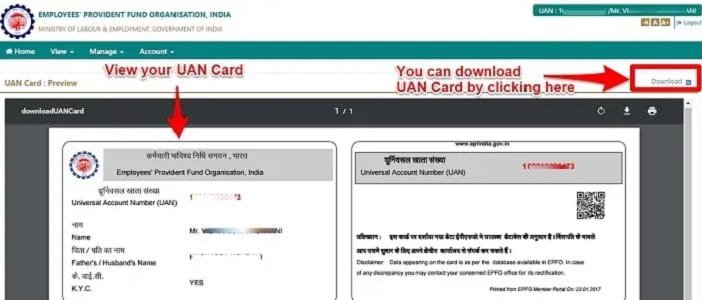
What Information Does a UAN Card Contain?
- Universal Account Number (UAN)
- Member Name
- Date of Birth
- Father’s / Spouse’s Name
- Current Employer Name and Establishment ID
- Date of joining EPF
Prerequisites for Downloading the UAN Card
- Active UAN allotted by your employer
- UAN activated on the EPFO member portal
- Mobile number registered with EPFO or UAN portal
How to Generate and Download UAN Card Online
Method 1: Through the EPFO Member Portal
- Visit the EPFO member portal: unifiedportal-mem.epfindia.gov.in
- Click on “Activate UAN” if you are logging in for the first time. Otherwise, log in with your UAN and password.
- After logging in, click on the “Download” tab in the top menu.
- Select “UAN Card” from the dropdown.
- Your UAN Card will be generated instantly as a PDF. Click “Download” to save it on your device.
Method 2: Through the UMANG App
- Download the UMANG app on your smartphone (available on iOS and Android).
- Search for “EPFO” within the app.
- Log in using your UAN and OTP.
- Navigate to “UAN Card” under the EPFO services section.
- Download or share the card directly from the app.
How to Activate UAN Before Downloading the Card
If your employer has registered you on EPFO but you have never logged in, you must first activate your UAN:
- Go to unifiedportal-mem.epfindia.gov.in and click “Activate UAN.”
- Enter your UAN, Aadhaar, mobile number, and date of birth.
- Verify via OTP sent to your registered mobile number.
- Set a new password. Your UAN is now activated and you can download your UAN card.
Where Is the UAN Card Used?
- EPF withdrawal and transfer claim forms
- Verification at EPFO offices
- Background verification during new employment
- Proof of EPF membership for loan applications (some banks accept it)
Troubleshooting Common Issues
UAN Card Not Downloading
This usually happens when KYC details are incomplete or when the browser’s pop-up blocker prevents the PDF from opening. Try a different browser or disable the pop-up blocker. Also ensure your Aadhaar and PAN are linked to your UAN.
Wrong Details on UAN Card
If your name, date of birth, or other details are incorrect, you need to get them corrected through your employer on the EPFO employer portal. After correction and EPFO approval, the updated UAN Card will reflect the correct information.
Frequently Asked Questions
Q: Is the UAN Card the same as the EPF passbook?
A: No. The UAN Card is an identity document showing your UAN and basic details. The EPF passbook shows your monthly contribution history, interest credits, and account balance. Both are available on the EPFO member portal.
Q: Can I download my UAN Card without Aadhaar?
A: Yes, if your UAN is already activated and your mobile number is registered with EPFO, you can log in using your UAN and password without needing Aadhaar at the time of download.
Q: Does the UAN Card expire?
A: No. The UAN Card does not have an expiry date. However, if your employer details change (due to a job switch), downloading a fresh UAN Card with the updated employer information is advisable.
Q: What if I have forgotten my UAN?
A: Visit the EPFO member portal and click “Know Your UAN Status.” Enter your Aadhaar, PAN, or mobile number to retrieve your UAN via OTP.
Q: Can I download a UAN Card for a previous employer?
A: The UAN Card shows your current/latest employer details. For historical records, the EPF passbook is more comprehensive as it shows all member IDs and contribution history across employers.