Checking your EPF balance is one of the most basic yet important financial activities for any salaried employee. Your EPF balance represents years of disciplined saving — and verifying it regularly ensures that your employer is depositing contributions correctly and that interest is being credited accurately. In 2026, EPFO provides multiple convenient methods to check your PF balance — online through the portal, via the UMANG mobile app, through SMS, or even with a missed call from your mobile phone.
This guide covers all available methods to check EPF balance in 2026, with step-by-step instructions for each approach, so you can choose the method that works best for your device and connectivity.
All Methods to Check EPF Balance Quick Reference
| Method | Requirement | What You Get | Time |
| EPFO Member Portal | UAN, password, internet | Full passbook with all transactions | Anytime |
| EPFO Passbook Portal | UAN, password, internet | Passbook PDF for each Member ID | Anytime |
| UMANG App | UAN, internet, smartphone | Balance + passbook on mobile | Anytime |
| Missed Call | Registered mobile, phone signal | Balance via SMS reply | 2 minutes |
| SMS | Registered mobile, phone signal | Balance + last contribution details | 2 minutes |
| EPFO SMS Alert | Aadhaar-linked mobile | Auto-alert on each contribution | Auto on contribution |
Method 1: Check EPF Balance on EPFO Member Portal
| 1 | Visit https://unifiedportal-mem.epfindia.gov.in and log in with UAN and password. |
| 2 | Click ‘View’ → ‘Passbook’. |
| 3 | Select the Member ID from the dropdown (if you have multiple employers). |
| 4 | Your complete EPF passbook loads showing all contributions and interest credits. |
| 5 | The ‘Net Balance’ at the bottom shows your current EPF corpus. |
Method 2: Check EPF Balance on Passbook Portal
| 1 | Visit https://passbook.epfindia.gov.in |
| 2 | Enter your UAN and EPFO password. |
| 3 | Select the Member ID to view and download the passbook. |
| 4 | The passbook shows month-by-month contributions and cumulative balance. |
Method 3: Check EPF Balance via Missed Call (No Internet)
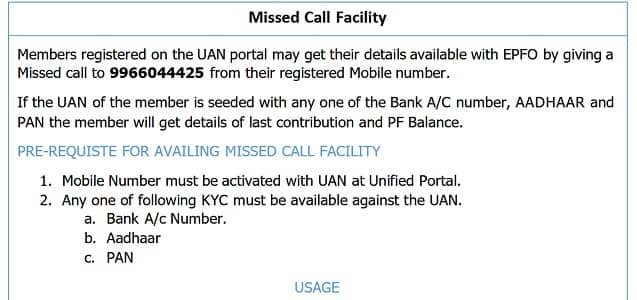
- Give a missed call from your Aadhaar/EPFO-registered mobile number to: 011-22901406
- After 2–3 rings, disconnect the call (the call is free – do not worry about charges).
- Within 2 minutes, you will receive an SMS with your last known EPF balance and last contribution details.
- Note: The mobile number must be registered with EPFO (the same number linked to your UAN/Aadhaar).
Method 4: Check EPF Balance via SMS
| 1 | Open your phone’s SMS app. |
| 2 | Type: EPFOHO UAN ENG (replace ‘ENG’ with your language code: HIN for Hindi, MAR for Marathi, etc.) |
| 3 | Send this SMS to 7738299899. |
| 4 | You will receive an SMS reply with your UAN, last contribution details, and current balance. |
| 5 | Available languages: ENG (English), HIN (Hindi), MAR (Marathi), GUJ (Gujarati), PUN (Punjabi), KAN (Kannada), TEL (Telugu), TAM (Tamil), MAL (Malayalam), BEN (Bengali). |
Method 5: Check via UMANG App
| 1 | Download UMANG app from Google Play Store or Apple App Store. |
| 2 | Register on UMANG using your mobile number. |
| 3 | Search for ‘EPFO’ and select the EPFO service. |
| 4 | Tap ‘Employee Centric Services’ → ‘View Passbook’. |
| 5 | Log in with your UAN and EPFO password to view your balance and passbook. |
Frequently Asked Questions (FAQs)
Q1. My EPF balance on the portal is different from what I expected – what could be wrong?
Ans: Discrepancies in EPF balance can have several causes. The most common is that your employer filed the ECR (Electronic Challan-cum-Return) but did not remit the full payment, causing contributions to be recorded but pending. Another cause is that the annual interest has not yet been credited (this happens after the Ministry of Finance ratifies the interest rate, typically between March and July of the following year). If you notice specific months missing from your passbook, it may indicate your employer failed to file ECR for those months. Verify the issue with your employer’s HR and raise a complaint with the EPFiGMS portal if employer contributions are genuinely missing. You can also file a complaint with EPFO’s enforcement wing, which can audit the employer.
Q2. Can I check EPF balance without a UAN?
Ans: Before UAN was introduced, EPF balance checking required the Member ID and employer’s regional PF office. If you have an old EPF account without a UAN (pre-2014 accounts), you can check the balance by visiting the EPFO Regional Office that covers your previous employer’s location with your Member ID. Alternatively, contact your previous employer’s HR to get your UAN generated and linked to the old Member ID. Once a UAN is created and linked, you can access all historical balances on the portal. EPFO’s SMS and missed call services also work without internet, but they require your UAN — making UAN generation the necessary first step for digital balance checking.
Q3. Why does my passbook show zero balance even though contributions have been made?
Ans: A zero balance in the passbook after contributions are visible could indicate a data synchronization delay — give it 24–48 hours and refresh. If it persists, it may be because the contributions were filed in the ECR but the payment (challan) is not yet processed by EPFO due to employer payment delays. The passbook balance updates only after the payment is fully reconciled by EPFO. Another cause could be that you are viewing the wrong Member ID in the passbook. If you have multiple Member IDs under your UAN, select each one individually — the balance you’re looking for may be under a different Member ID from a previous employer.
Q4. Does the EPF balance shown include the employer’s 8.33% EPS contribution?
Ans: No. The EPF balance shown in your passbook does NOT include the employer’s 8.33% EPS contribution. The passbook only shows your own 12% employee contribution and the employer’s 3.67% EPF contribution — these together constitute your EPF corpus. The employer’s 8.33% EPS portion goes into EPFO’s central pension fund and does not appear in your individual passbook as a balance. This is one of the most common sources of confusion: many employees wonder why their employer’s total contribution (12%) doesn’t fully reflect in the passbook — it’s because only 3.67% of the employer’s 12% goes into their EPF account.
Q5. How do I check EPF balance for multiple jobs?
Ans: If you have worked with multiple employers, all the Member IDs from past and present employers should be linked to your single UAN. On the EPFO Member Portal passbook section, there is a dropdown menu to select the Member ID — you can switch between different Member IDs to view the balance and passbook for each employer separately. The total EPF balance across all your Member IDs is the sum of balances in each passbook. For a consolidated view, the EPFO portal’s ‘Service History’ section shows all linked employers, and the passbook portal allows viewing each Member ID’s history. Ideally, after each job change, transfer the balance from the old Member ID to the new one via Form 13, consolidating everything into a single active account.
Conclusion
Checking your EPF balance is a 2-minute activity that every EPFO member should do at least monthly — ideally right after their salary is credited, to confirm the employer’s contribution has been deposited. With five different methods available in 2026 (portal, passbook portal, UMANG app, SMS, and missed call), there is no excuse for not monitoring your retirement savings regularly.
Make it a habit: check your EPF passbook monthly, cross-reference with your salary slip’s PF deduction, and immediately flag any discrepancy with your employer’s HR team. Your EPF is your largest retirement asset — treat it with the same attention you give your bank account.
Disclaimer: This article is for informational purposes only. Always refer to the official EPFO website at www.epfindia.gov.in for current information.