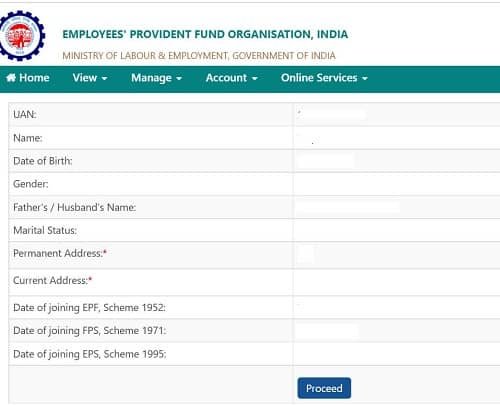




The Universal Account Number, commonly known as UAN, is one of EPFO‘s most transformative digital innovations. Introduced in 2014, UAN is a 12-digit unique identification number assigned to every EPF member — one that remains constant throughout their entire working life, regardless of how many times they change jobs, cities, or industries.
Before UAN, every time an employee changed jobs, their PF account became fragmented — a new account number at a new employer, with the previous balance often forgotten or difficult to transfer. UAN solved this by creating a single, portable identity that links all PF accounts across employers, making the entire EPF ecosystem — balance checking, claim filing, PF transfers, KYC updates — accessible through a single login on the EPFO Member Portal or UMANG app.
| Feature | Details |
| Format | 12-digit unique numeric code |
| Issued By | EPFO (via employer) |
| Lifetime Validity | Permanent – does not change across jobs |
| Activation | One-time activation on EPFO portal using Aadhaar OTP |
| Linked To | All Member IDs (PF account numbers) across employers |
| Portal | https://unifiedportal-mem.epfindia.gov.in |
| UMANG App | Available for UAN-based login and all services |
| Helpline | 1800-118-005 (Toll-Free) |
How is UAN Generated?
UAN generation is an employer-initiated, EPFO-managed process. When you join a new employer and they file their first ECR (Electronic Challan-cum-Return) that includes your name, your EPFO auto-generates a UAN and maps it to your Aadhaar. If you already have a UAN from a previous employer, the new employer links your new Member ID to the existing UAN instead of creating a duplicate.
The UAN is sent to your Aadhaar-linked mobile number via SMS. EPFO also provides UANs through employers, who are required to communicate it to employees within the first payroll cycle. Once you have your UAN, you must activate it on the EPFO portal using your Aadhaar OTP before you can access any online services.
Services Available Through Your UAN
| Service | Description |
| View EPF Passbook | Download monthly contribution statements for all Member IDs |
| Check PF Balance | See current EPF corpus across all linked accounts |
| File Online Claim | Submit withdrawal, advance, or transfer claim online |
| Track Claim Status | Monitor real-time claim processing and settlement |
| Update KYC | Link Aadhaar, PAN, and bank account for seamless claims |
| e-Nomination | Designate nominees for EPF and EPS benefits online |
| Transfer PF | Transfer accumulated balance via Form 13 (online) |
| Raise Grievance | Submit and track complaints via EPFiGMS portal |
How UAN Enables PF Portability Across Jobs
PF portability is one of the most valuable features enabled by UAN. When you change employers, your EPF savings do not disappear or get locked — they remain in your previous employer’s Member ID, fully linked to your UAN. You can transfer the accumulated balance to your new employer’s Member ID by filing a Transfer Claim (Form 13) online through the EPFO Member Portal with just a few clicks.
This seamless portability ensures that your entire PF savings — from your first job to your last — accumulate under one roof. It also means that your EPS (pension) service years are never lost: the EPFO system calculates your total qualifying service across all employers linked to your UAN, ensuring your pension entitlement grows continuously throughout your career.
How to Check Your UAN and PF Balance
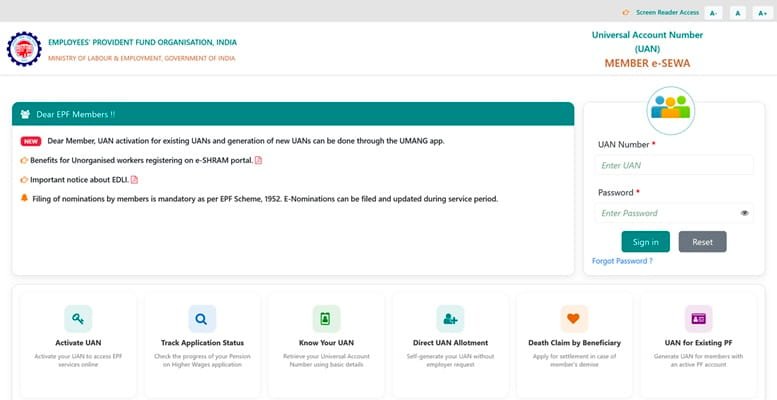
- Online: Log in to https://unifiedportal-mem.epfindia.gov.in with your UAN and password.
- UMANG App: Login with UAN on the UMANG app and access passbook, balance, and claims.
- Missed Call: Give a missed call to 011-22901406 from your registered mobile number.
- SMS: Send ‘EPFOHO UAN ENG’ to 7738299899 from your registered mobile.
- Email Alerts: EPFO sends automated email and SMS notifications for every contribution credited.
Frequently Asked Questions (FAQs)
Q1. What should I do if I forget my UAN?
A: If you have forgotten your UAN, you can retrieve it through multiple channels. The simplest method is to visit the EPFO Member Portal at https://unifiedportal-mem.epfindia.gov.in and click on ‘Know Your UAN Status’. You will need to enter your Aadhaar number or PAN number along with your registered mobile number, and your UAN will be sent to your mobile via OTP. Alternatively, you can give a missed call to 011-22901406 from your Aadhaar-registered mobile number to receive your UAN and last-contributed balance details via SMS. Your employer’s HR department also has access to your UAN and can provide it to you. Additionally, your UAN is printed on your salary slip if your employer mentions it.
Q2. Can I have two UANs?
A: No. Every EPF member is entitled to only one UAN throughout their career, and EPFO strictly prohibits dual UANs. Your UAN is your lifelong EPF identity and is linked to your Aadhaar, making duplication virtually impossible. If you inadvertently have two UANs — possibly because an employer generated a new one instead of linking to your existing UAN — you must report this immediately to your current employer and the nearest EPFO Regional Office. EPFO will deactivate the duplicate UAN and consolidate all Member IDs under your original UAN. Maintaining two active UANs can lead to complications in claim settlement and may flag your account for compliance review.
Q3. Is UAN activation mandatory?
A: Yes, UAN activation is essential for accessing any EPFO online service. Without activating your UAN, you cannot log into the EPFO Member Portal, check your PF balance, download your passbook, file online claims, update KYC, or submit nominations. Activation is a simple one-time process that takes just 2–3 minutes: visit the EPFO portal, click ‘Activate UAN’, enter your UAN and Aadhaar details, and verify via OTP sent to your Aadhaar-linked mobile. You will then set a password, and your UAN will be permanently activated. EPFO strongly recommends activating your UAN within the first week of receiving it from your employer.
Q4. Does UAN change when I change jobs?
A: No. The UAN is permanent and does not change when you change employers — this is precisely its purpose. When you join a new employer, they will link a new Member ID (PF Account Number specific to your employment with them) to your existing UAN. All your previous Member IDs from past employers remain linked to the same UAN, giving you a consolidated view of your entire PF history across all jobs. This portability is what makes UAN the backbone of India’s EPF system, enabling seamless PF transfers, continuous service tracking for EPS pension, and a single login for all EPFO services regardless of how many jobs you have held.
Q5. Can I check my EPF balance without internet using my UAN?
A: Yes, EPFO provides two offline methods to check EPF balance using your UAN without internet access. The first is a Missed Call service: give a missed call from your UAN-registered mobile number to 011-22901406. EPFO will send an automated SMS reply containing your latest PF balance and the last contribution details. The second is an SMS service: send ‘EPFOHO UAN ENG’ (replace ENG with your preferred language code — HIN for Hindi, MAR for Marathi, etc.) to 7738299899 from your registered mobile. You will receive an SMS with your balance information. Both services are free of charge and work on any mobile phone, including basic feature phones, making EPF balance checking accessible to all members.
Conclusion
Your UAN is the single most important identifier in your EPF journey. It is your lifelong EPF identity — portable, permanent, and powerful. From the moment it is generated to the day you retire, your UAN connects every EPF account you will ever hold, every claim you will ever file, and every rupee you will ever save through EPFO.
Activate your UAN promptly, complete your KYC, keep your registered mobile number updated, and use the EPFO portal or UMANG app regularly. These simple habits ensure that your UAN serves as an efficient, reliable gateway to all your EPF benefits throughout your career.