


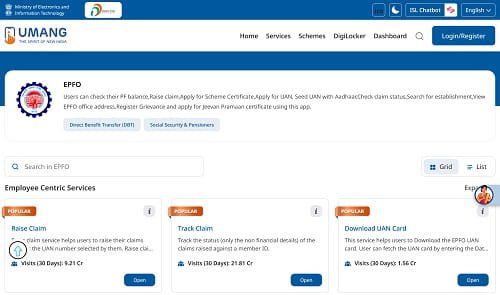
The UMANG (Unified Mobile Application for New-age Governance) app is the official government mobile platform that brings together services from over 1,500 Central and State Government departments — including EPFO — into a single smartphone application. For EPFO members, UMANG provides a mobile-native interface to access virtually all EPF services: balance checking, passbook download, claim filing, KYC update, grievance submission, and more — directly from an Android or iOS smartphone.
In 2026, with most Indians accessing the internet primarily through mobile devices, UMANG has become the preferred way for many EPFO members to manage their provident fund. This comprehensive guide covers UMANG’s EPF-specific features, how to get started, and how to use each service effectively.
UMANG App Quick Facts
| Feature | Details |
| App Name | UMANG – Unified Mobile Application for New-age Governance |
| Developed By | National e-Governance Division (NeGD), Government of India |
| Available On | Android (Google Play Store), iOS (Apple App Store) |
| Download Size | Approx. 30–50 MB |
| Login Method | Mobile OTP registration + UAN login for EPFO services |
| Internet Required | Yes (Wi-Fi or mobile data) |
| EPFO Services | Passbook, balance, claims, KYC, grievance, nomination |
| Language Support | Multiple Indian languages |
How to Download and Set Up UMANG
| 1 | Open Google Play Store (Android) or Apple App Store (iOS) on your smartphone. |
| 2 | Search for ‘UMANG’ and look for the official app by National e-Governance Division. |
| 3 | Tap ‘Install’ or ‘Get’ to download and install the app. |
| 4 | Open UMANG and register using your mobile number (OTP verification required). |
| 5 | Once registered, search for ‘EPFO’ in the UMANG app’s search bar. |
| 6 | Tap on the EPFO service tile in the search results. |
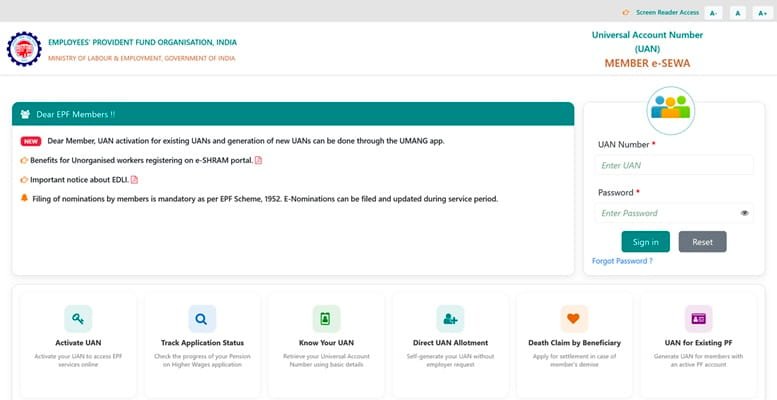
| 7 | Log in to EPFO services using your UAN and EPFO portal password. |
Complete List of EPFO Services Available on UMANG
| Service Category | Specific Feature | What You Can Do |
| Employee Centric | View Passbook | See and download passbook for all Member IDs |
| Employee Centric | Raise Claim | File Form 31, 19, 10C, 10D online |
| Employee Centric | Track Claim | Monitor claim status in real time |
| Employee Centric | One Member – One EPF Account | Initiate PF transfer (Form 13) |
| Employee Centric | KYC Update | Add/update Aadhaar, PAN, bank account |
| Employee Centric | e-Nomination | View and update EPF/EPS nominees |
| General | Member UAN Status | Check if UAN is active |
| General | Know Your EPF Balance | Quick balance check via UAN |
| General | EPFO Locator | Find nearest EPFO Regional Office |
| General | Raise Grievance | Submit and track complaints via EPFiGMS |
How to Check EPF Balance on UMANG
| 1 | Open UMANG → search ‘EPFO’ → tap EPFO service. |
| 2 | Tap ‘Employee Centric Services’. |
| 3 | Tap ‘View Passbook’. |
| 4 | Login with UAN and EPFO password. |
| 5 | Select Member ID from dropdown to view balance and transaction history. |
How to File an EPF Claim on UMANG
| 1 | Open UMANG → EPFO → Employee Centric Services → Raise Claim. |
| 2 | Login with UAN and password. |
| 3 | Verify bank account last 4 digits and accept undertaking. |
| 4 | Select claim type: PF Advance (Form 31), Full Settlement (Form 19), Pension (Form 10C/10D). |
| 5 | Fill required details, upload documents if needed. |
| 6 | Verify with Aadhaar OTP and submit. |
| 7 | Note the claim reference number for tracking. |
Frequently Asked Questions (FAQs)
Q1. Is UMANG safe for EPF transactions?
Ans: Yes, UMANG is an official government app developed by the National e-Governance Division under the Ministry of Electronics and Information Technology. It uses government-standard security protocols including HTTPS encryption, OTP-based authentication, and secure government server connections. All EPFO transactions through UMANG use the same backend infrastructure as the EPFO web portal — there is no difference in security or data integrity. However, always download UMANG only from official sources (Google Play Store or Apple App Store) and verify the publisher is ‘National e-Governance Division’. Avoid third-party versions or APK downloads that claim to be UMANG.
Q2. Can I use UMANG without an internet connection for EPFO services?
Ans: No. UMANG requires an active internet connection (Wi-Fi or mobile data) to access EPFO services, as all transactions are processed through live server connections to EPFO’s backend. The only internet-independent methods for EPF balance checking are the SMS (send EPFOHO UAN ENG to 7738299899) and missed call (011-22901406) services, which work on basic mobile networks. For comprehensive EPFO transactions like claim filing, passbook viewing, and KYC updates, a stable internet connection is required. UMANG does not have significant offline functionality for EPFO services.
Q3. UMANG login fails every time I try – what should I do?
Ans: UMANG login failures for EPFO services can occur due to several reasons. First, ensure your EPFO portal password is correct — test it by logging into the web portal (https://unifiedportal-mem.epfindia.gov.in) directly. If the web login also fails, reset your password using the ‘Forgot Password’ option with your registered mobile’s OTP. Second, check that you’re entering your UAN (not email or mobile) as the username in the EPFO section of UMANG. Third, if EPFO servers are under maintenance (often during late nights or announced maintenance windows), UMANG services will temporarily fail. Fourth, ensure your UMANG app is updated to the latest version from the Play Store or App Store, as older versions may have compatibility issues.
Q4. Can senior citizens or non-tech-savvy members use UMANG for EPFO?
Ans: UMANG is designed to be accessible but does have a moderate learning curve for first-time users. Senior citizens or non-tech-savvy members can benefit from the app with some initial assistance. UMANG has a simple interface with large icons and supports multiple Indian languages — select your preferred language in the app settings. For members who find the app challenging, an alternative is to use the SMS and missed call balance checking services which are very simple. For more complex tasks like claim filing, such members may prefer visiting the EPFO Regional Office with a printed composite claim form and required documents, where EPFO staff can assist with the submission.
Q5. Does UMANG also provide ESIC services alongside EPFO?
Ans: Yes. UMANG is a unified government services app that integrates services from over 1,500 central and state government departments — including both EPFO and ESIC. ESIC-covered employees can access ESIC services on UMANG such as e-pehchan card, benefit claim tracking, and hospital search alongside their EPFO services. Both EPFO and ESIC appear as separate service tiles in UMANG’s ‘Social Security’ or ‘Labour’ category. For employees who are covered under both EPFO (for PF) and ESIC (for health insurance), UMANG provides a convenient single app for accessing both social security systems on their smartphone.
Conclusion
The UMANG app has transformed EPFO service access for mobile-first India. In 2026, the ability to check your EPF balance, download your passbook, file a claim, update KYC, and track grievances from a smartphone in minutes — at any time and from any location — represents a fundamental improvement in government service accessibility.
Download UMANG, set up your EPFO login, and explore the services available. For the vast majority of EPFO transactions, the UMANG app is faster, more convenient, and more accessible than visiting a Regional Office or even using the desktop portal. Make it your go-to tool for managing your provident fund on the go.