



A name mismatch between your EPFO records and your Aadhaar card is one of the most frustrating EPF problems to encounter — especially when you are trying to withdraw your hard-earned savings. Since EPFO now uses Aadhaar for identity verification and KYC, even a minor spelling difference can block claim settlement entirely. The good news is that name mismatches are correctable, and in many cases, the process is straightforward. Here is everything you need to know about fixing a name mismatch in EPFO records in 2026.
Why Does a Name Mismatch Happen?
Name mismatches between EPFO and Aadhaar records arise for several reasons:
- The employer entered the name during UAN generation with a different spelling than what appears on the employee’s Aadhaar
- The employee’s Aadhaar has a shortened or initialised name (e.g., “R. Kumar” vs. “Rajesh Kumar”)
- Aadhaar was updated after marriage (name change after marriage) but EPFO records were not updated
- Data entry errors during initial EPF registration at a previous employer
- Transliteration differences in regional names (e.g., “Rajesh” vs. “Rajech”)
A name mismatch flags the Aadhaar KYC as “failed” in EPFO records. This prevents online claim filing, online transfer, and e-Nomination using Aadhaar OTP until the mismatch is resolved.
Step 1: Determine Which Record Is Correct
Before initiating a correction, establish which document carries the legally correct name. The documents that establish your correct name for EPF purposes are:
- Aadhaar card (highest priority for EPFO KYC)
- PAN card
- Passport
- School Leaving Certificate or Matriculation Certificate
- Gazette notification (for legal name changes after marriage or by choice)
Since EPFO uses Aadhaar as the primary KYC document, the name in EPFO should match the name on Aadhaar. If Aadhaar has the error, fix Aadhaar first (at an Aadhaar enrollment center). If EPFO has the error, proceed with the EPFO correction process.
Step 2: Minor vs. Major Name Corrections
Minor Corrections (Spelling Errors — Employer Can Approve)
Corrections involving minor spelling differences — one or two characters, obvious typographical errors — can be processed through the EPFO employer portal with employer approval and do not require EPFO regional office intervention.
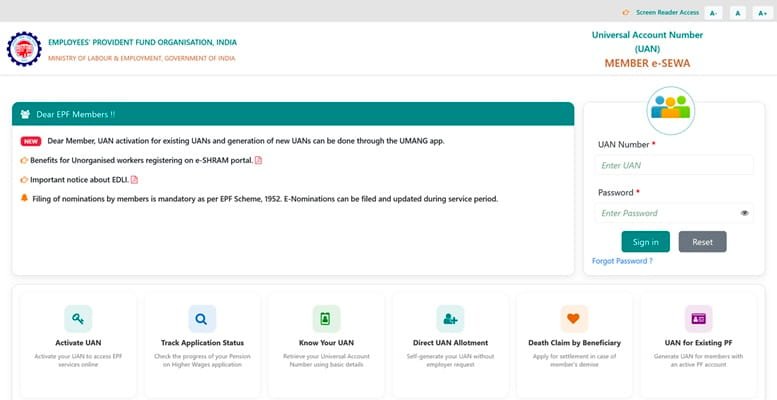
- Employee logs into the EPFO member portal (unifiedportal-mem.epfindia.gov.in)
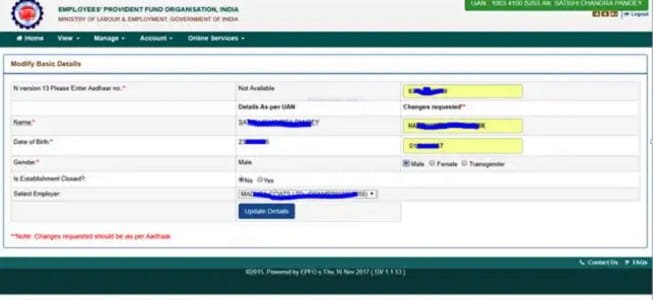
- Goes to Manage > Modify Basic Details
- Selects the field to correct and enters the correct name (as per Aadhaar)
- Submits the request for employer review
- Employer approves the correction in the employer portal
- EPFO verifies against Aadhaar records and approves — typically within 7-10 working days
Major Corrections (Significant Name Changes — Joint Declaration Required)
Where the name difference is substantial — more than minor spelling variants — a Joint Declaration process is required. This involves both the employer and employee signing a declaration form.
- Download the Joint Declaration form from the EPFO portal or regional office
- Fill in the incorrect name (as currently in EPFO), correct name (as per Aadhaar), reason for discrepancy, and UAN
- Both employee and authorised employer signatory sign the form
- Attach supporting documents: Aadhaar, PAN, any other government ID showing the correct name
- Submit to the EPFO regional office — in person, by post, or through the EPFO grievance portal
Step 3: Verify Aadhaar-EPFO Linkage Post Correction
After the correction is processed:
- Log into the EPFO member portal
- Go to Manage > KYC
- Check that the Aadhaar KYC status now shows “Verified” (green tick)
- If still showing “Failed,” wait 48 hours and re-check. If the issue persists, raise a grievance on the EPFO portal.
What If the Employer Is Not Cooperating?
If your current employer is unresponsive or your previous employer is no longer traceable, you can approach the EPFO regional office directly with:
- Your Aadhaar card showing the correct name
- PAN card
- A self-declaration explaining the discrepancy
- Any employment document (offer letter, payslip) showing the name as used during that employment
The EPFO regional office can process corrections without employer cooperation in cases where the employer is defunct or unresponsive, using Aadhaar as the primary identity anchor.
Name Change After Marriage
If you have legally changed your name after marriage and updated your Aadhaar, you need to update EPFO accordingly. This requires:
- Marriage certificate
- Updated Aadhaar showing the new name
- A Joint Declaration or modification request through the EPFO portal
Post-marriage name changes are treated as legitimate name updates, not discrepancies, and are usually processed smoothly.
Frequently Asked Questions
Q: Can I file an EPF withdrawal claim despite a name mismatch?
A: Online claims require verified Aadhaar KYC, which fails if the name mismatches. You can file a physical claim at the EPFO regional office with employer attestation and full supporting documents as an exception. However, resolving the mismatch first and then filing online is faster and more reliable.
Q: How long does a name correction take in EPFO?
A: Minor corrections with employer approval take 7-15 working days. Joint Declaration corrections requiring regional office review typically take 20-40 working days depending on the office workload and document completeness.
Q: What if my Aadhaar name is in a regional language and EPFO records are in English?
A: EPFO records are maintained in English transliteration. If your Aadhaar name transliteration differs from how EPFO has your name, the standard name correction process applies. Use the Aadhaar-linked English name (as shown on the Aadhaar card) as the reference.
Q: Does a name mismatch affect my EPF interest earnings?
A: No. Interest continues to accrue normally on your EPF balance regardless of KYC mismatch status. The mismatch only affects your ability to file claims online or complete Aadhaar-based transactions. Your balance is safe.
Q: My name in EPFO has an extra middle name not in my Aadhaar. Is that a mismatch?
A: Yes, extra words in either direction constitute a mismatch for EPFO’s automated verification system. The name in EPFO must exactly match the name in Aadhaar for KYC to pass. You will need to either update EPFO to remove the extra middle name or add it to your Aadhaar, whichever reflects your legally correct name.