The Employees’ Provident Fund Organisation (EPFO) is one of the largest social security organisations in India, managing provident fund accounts for millions of salaried employees. In 2026, EPFO continues to empower members through its Unified Member Portal, providing seamless online access to PF accounts, passbooks, claims, and more.
The EPFO Member Login portal allows employees to check their EPF balance, view passbook transactions, update personal details, track claim status, and manage their retirement savings – all from the comfort of their home or office. This complete guide walks you through everything you need to know about accessing and using the EPFO Member Portal in 2026.
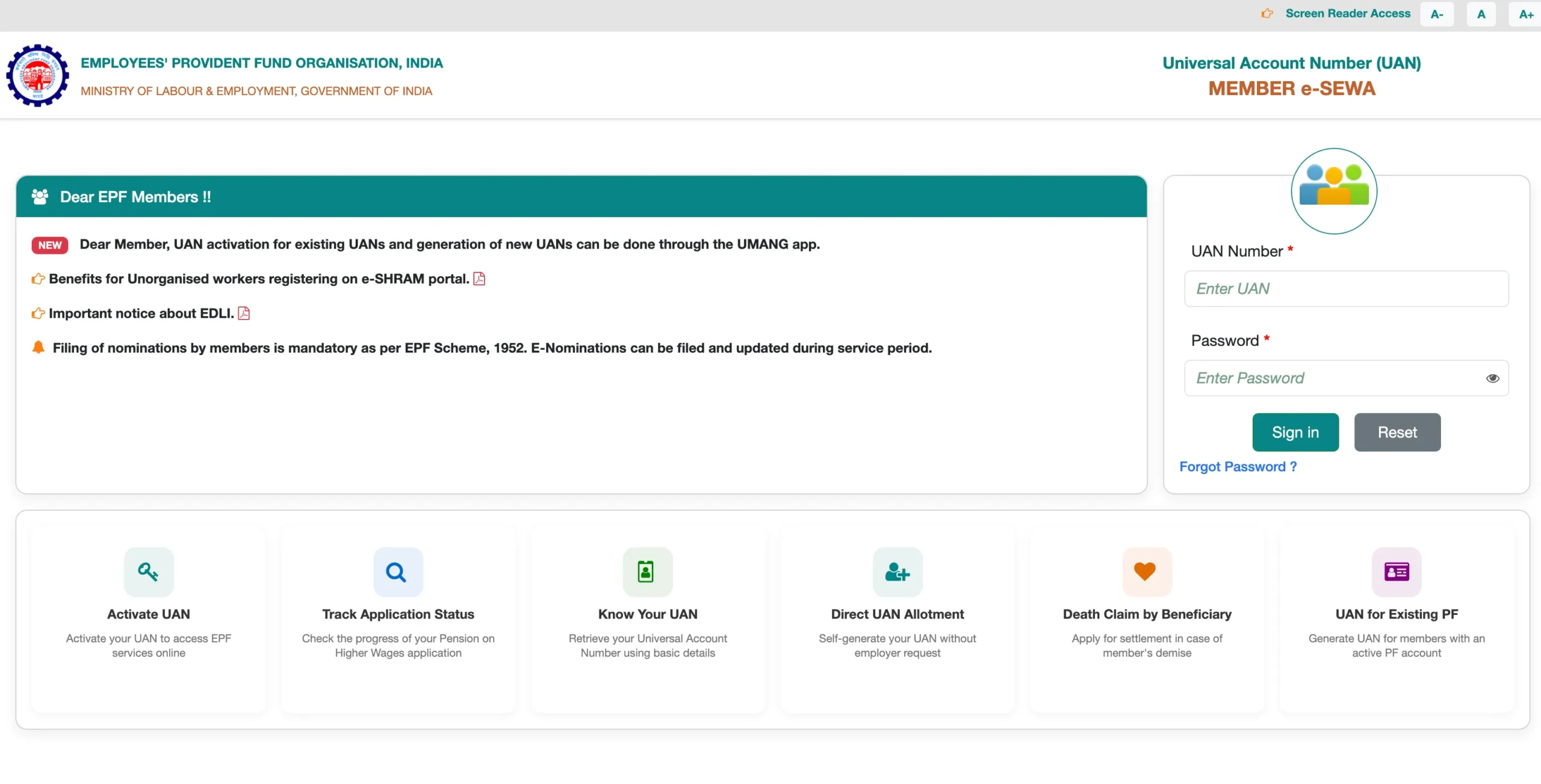
EPFO Member Portal – Quick Overview
|
Feature |
Details |
|
Portal Name |
EPFO Member Portal (Unified Member Portal) |
|
Official Website |
https://unifiedportal-mem.epfindia.gov.in |
|
Launched By |
Employees Provident Fund Organisation (EPFO) |
|
Login Credentials |
UAN (Universal Account Number) + Password |
|
Availability |
24×7 Online Access |
|
Mobile App |
UMANG App (Available on Android & iOS) |
Prerequisites for EPFO Member Login
Before you log into the EPFO Member Portal, ensure the following requirements are fulfilled:
- Active UAN (Universal Account Number) – allotted by your employer
- UAN must be activated on the EPFO portal
- Mobile number linked and verified with UAN
- Password created during UAN activation or reset via OTP
- Aadhaar number linked to UAN (mandatory as per latest EPFO norms)
- Bank account linked and verified for claim processing
Step-by-Step Guide to EPFO Member Login 2026
Follow these simple steps to log into your EPFO account on the Unified Member Portal:
|
1 |
Open your browser and visit the official EPFO Member Portal: https://unifiedportal-mem.epfindia.gov.in |
|
2 |
On the homepage, locate the ‘Member UAN/Online Services’ section. |
|
3 |
Enter your UAN (Universal Account Number) in the designated field. |
|
4 |
Type your password in the password field (case-sensitive). |
|
5 |
Enter the CAPTCHA code displayed on the screen accurately. |
|
6 |
Click the ‘Sign In’ button to access your PF account dashboard. |
Once logged in, you will be directed to your personalized Member Dashboard, where you can access all EPF-related services.
How to Activate Your UAN for First-Time Login
If you are logging in for the first time, you must first activate your UAN before you can set a password and sign in:
- Visit the EPFO portal and click on ‘Activate UAN’ under the ‘Important Links’ section.
- Enter your UAN, Member ID, Aadhaar number, Name, Date of Birth, and registered mobile number.
- Click ‘Get Authorization PIN’ – an OTP will be sent to your registered mobile.
- Enter the OTP and click ‘Validate OTP and Activate UAN’.
- Set a strong password for your account. Your UAN is now activated.
- You can now use the EPFO Member Login page to sign in with your UAN and new password.
Services Available After EPFO Member Login
Once you log into the EPFO Member Portal, a wide range of online services are available to you:
1. View EPF Passbook
Access your complete EPF passbook including employer and employee contributions, interest credits, and transaction history for all member IDs linked to your UAN.
2. Check PF Balance
View your current PF balance instantly. The passbook is updated regularly by EPFO and reflects all approved transactions.
3. Submit Online Claims
File online claims for PF withdrawal (Form 19), pension withdrawal (Form 10C), PF advance (Form 31), and transfer of PF accounts (Form 13) – all without visiting an EPFO office.
4. Track Claim Status
After submitting a claim, use the portal to track its real-time status – from submission to settlement and NEFT credit to your bank account.
5. Update KYC Details
Link and update your Aadhaar, PAN, bank account, and other KYC documents directly through the portal. Approved KYC ensures faster claim processing.
6. Manage Nominations
Update your EPF and EPS (Employees’ Pension Scheme) nominations online through the e-Nomination facility to ensure your family is protected.
7. Member Profile & Contact Update
Update your email address, contact number, and view employer details linked to your UAN from the profile section.
How to Reset EPFO Member Login Password
If you have forgotten your EPFO portal password, follow these steps to reset it:
- Go to the EPFO Member Portal login page.
- Click on ‘Forgot Password?’ below the login form.
- Enter your UAN and registered mobile number.
- An OTP will be sent to your registered mobile number.
- Enter the OTP and set a new strong password.
- Log in using your UAN and newly created password.
Note: Your mobile number must be registered and active with EPFO. If your mobile number has changed, contact your employer or the nearest EPFO office for assistance.
EPFO Login via UMANG App – Access PF Account on Mobile
EPFO services are also available on the UMANG (Unified Mobile Application for New-age Governance) app. Here’s how to access your PF account on mobile:
- Download the UMANG app from Google Play Store or Apple App Store.
- Register on UMANG using your mobile number.
- Search for ‘EPFO’ in the app’s search bar.
- Select the EPFO service and log in using your UAN and password.
- Access your passbook, raise claims, and check balance directly from the app.
The UMANG app provides a convenient mobile-first experience for EPFO members, especially for checking PF balance and submitting standard claims on the go.
Common EPFO Login Issues & Solutions
Issue: Invalid UAN or Password – Ensure your UAN is correct and your password is entered with the correct case. Reset password via OTP if needed.
Issue: CAPTCHA Not Loading – Refresh the page or try a different browser. Clear your browser’s cache and cookies before retrying.
Issue: UAN Not Activated – Use the ‘Activate UAN’ option on the portal. You will need your Member ID provided by your employer.
Issue: OTP Not Received – Ensure your mobile number is correctly registered with EPFO. Contact your employer if the number is outdated.
Issue: Account Temporarily Locked – After multiple failed login attempts, your account may be locked. Wait 30 minutes and try again or reset your password.
Important Tips for EPFO Member Portal Users
- Always use the official EPFO website: https://unifiedportal-mem.epfindia.gov.in to avoid phishing sites.
- Keep your UAN, Aadhaar, and bank account details updated to avoid delays in claim settlement.
- Link your Aadhaar to UAN for instant PF withdrawal eligibility (for claims up to Rs. 1 lakh).
- Regularly check your passbook to verify that employer contributions are being deposited.
- Do not share your UAN, password, or OTP with anyone, including people claiming to be EPFO officials.
- Use EPFO’s official grievance portal (EPFiGMS) if you face issues unresolved through the member portal.
Conclusion
The EPFO Member Login portal is a powerful, user-friendly platform that puts full control of your provident fund account in your hands. Whether you want to check your PF balance, download your passbook, submit a withdrawal claim, or update your KYC – everything can be done online in 2026 without any physical paperwork.
By keeping your UAN active, Aadhaar linked, and KYC updated, you can make the most of EPFO’s digital services. Bookmark the official EPFO Member Portal, use the UMANG app for on-the-go access, and stay informed about the latest EPFO updates to ensure a smooth and hassle-free provident fund experience throughout 2026 and beyond.
Disclaimer: This guide is for informational purposes. Always refer to the official EPFO website for the most current information.