Adding a new employee to EPFO is one of the first payroll compliance tasks after onboarding. Every eligible employee must be registered on the EPFO portal before their first contribution is due. The process involves checking for an existing UAN, uploading KYC, and including the employee in the next ECR. Here is the complete process for employers.
Step 1 — Check If the Employee Already Has a UAN
Always ask the new joinee for their existing UAN during onboarding. Never generate a new UAN without checking — duplicate UANs create significant compliance issues for both employer and employee. The employee can find their UAN on their old payslips, appointment letters, or by logging into the EPFO member portal.
As an employer, you can also verify by going to the EPFO employer portal > Member > Member UAN Search — enter the employee’s Aadhaar or PAN to check for an existing UAN.
Step 2 — Generate UAN (Only If Employee Has None)
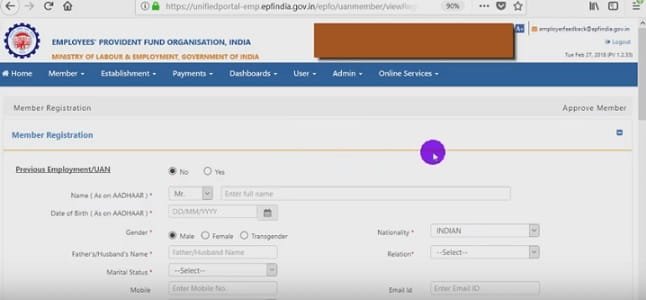
- Log into the EPFO employer portal (unifiedportal-emp.epfindia.gov.in)
- Navigate to Member > Register Individual
- Enter employee details: name, date of birth, gender, father’s/spouse’s name, mobile number, email, and date of joining
- Upload Aadhaar details for eKYC verification
- Click “Approve” — the UAN is generated instantly
Step 3 — Upload and Approve KYC
After UAN generation, upload the employee’s KYC documents:
- Navigate to Member > KYC
- Search for the employee’s UAN
- Upload Aadhaar, PAN, and bank account details
- Approve the KYC on the portal (this is the employer approval step)
Note: The employee must also verify their Aadhaar-linked OTP on the member portal for Aadhaar KYC to be marked “Verified.” Bank account and PAN are approved solely by the employer.
Step 4 — Mark Joining Date Accurately
The date of joining in the EPFO system determines from which month the employee’s contributions will be included. Enter the actual date of joining — not the date of EPF registration. Contributions are due from the joining date.
Step 5 — Include in Next ECR
In the next monthly ECR upload, include the new employee’s UAN, wages, and contribution amounts. The employee’s details will now show up on the EPFO member portal and they can start viewing their passbook.
What to Do If the Employee’s UAN Is Already Linked to a Previous Employer
When a new employee’s UAN is still linked to the previous employer, you need to take over the UAN under your establishment:
- The employee must exit from the previous employer’s records (mark exit date in the previous employer’s portal) OR
- You can link the employee’s UAN to your establishment using the “Take Over” process on the EPFO employer portal
- Once linked, you can upload KYC and include the employee in your ECR
Common Errors When Adding Employees
Mismatch in Name or Date of Birth
If the employee’s name or date of birth in the EPFO portal does not match their Aadhaar, KYC approval will fail. Raise a correction request through the portal for minor name/DOB mismatches.
Duplicate UAN Generation
Always search before generating. Once a duplicate is created, the merger process is time-consuming. Prevention is far easier than the cure.
Frequently Asked Questions
Q: How soon must we add a new employee to EPFO after joining?
A: Ideally, within the month of joining. The employee must be included in the ECR for the joining month, which is due by the 15th of the following month.
Q: What if the new employee refuses to share their UAN or Aadhaar?
A: EPF enrollment is mandatory for eligible employees — it is not optional. Explain that withholding this information delays their own EPF benefits. If the employee still refuses, document your efforts and escalate to HR/legal for guidance.
Q: Can we add multiple employees at once?
A: Yes. The EPFO employer portal allows bulk upload of new members using an Excel template. This is practical for large batches, such as when onboarding for a new project or at the start of an academic year.
Q: Do we need to upload KYC for employees who already have a verified UAN from a previous employer?
A: You still need to link the employee to your establishment and verify that KYC is complete. If their Aadhaar and PAN are already approved, you typically only need to add bank account details.
Q: What happens if we forget to add a new employee to EPFO for 2–3 months?
A: You must back-file the missed months by filing a revised or supplementary ECR for those months. The missed contributions plus interest are payable. Proactively doing this is better than waiting for an audit.